
The best web scraping API in 2026 for most production workloads is Context.dev. It finished first on three public scraping benchmarks this fall and charges one credit per page with JavaScript rendering and anti-bot handling included. Firecrawl, Spider, and Scrapfly are the strongest alternatives, and the right pick depends on your pages, your volume, and how each vendor bills.
A web scraping API is a hosted service that fetches a URL, renders it in a browser when needed, gets past bot protection, and returns the page as HTML, Markdown, or structured JSON. This guide ranks the 12 that matter in 2026, using dated benchmark results and list prices checked on November 24, 2026.
The best web scraping API for each use case
- Best overall, AI agents and RAG: Context.dev. One API for scrape, crawl, URL mapping, web search, schema-driven JSON, batches, and a hosted MCP server, from $20 a month and $0.50 per 1,000 pages on the Scale plan.
- Best with an open-source option: Firecrawl. A managed cloud from $19 a month for 5,000 credits, plus an open-source core you can self-host.
- Best for streaming bulk crawls: Spider. A Rust crawler with streaming output, pay-as-you-go top-ups from $5, and concurrency-based Unlimited plans from $40 a month.
- Best for per-request anti-bot tuning: Scrapfly. Granular Anti Scraping Protection controls from $30 a month for 200,000 credits, and 36 of 40 tasks finished on Scrapingbench.
- Best for proxy scale and prebuilt datasets: Bright Data. 437+ prebuilt Scraper APIs from $0.75 per 1,000 records and 150M+ residential IPs in 195 countries.
- Best for Scrapy teams: Zyte. Success-only billing, tiered by how hard each website is, from the maintainers of Scrapy.
- Best for cheap static pages you already parse: ScrapingBee. 1 credit per request without JavaScript, and 1,000,000 credits for $99 a month.
- Best for retail and search targets: ScraperAPI. Async batch jobs and prebuilt structured endpoints for Amazon, Google, and Walmart.
- Best for residential coverage with success billing: Oxylabs. 175M+ residential IPs, and failed requests do not use quota.
- Best for protected pages on a credit budget: ZenRows. One credit pool for basic, JavaScript, and protected pages, from $16 a month billed yearly.
- Best for niche sites with a ready-made scraper: Apify. 10,000+ marketplace Actors, plus the open-source Crawlee library for custom code.
- Best for a quick single-URL read: Jina Reader. Prefix any URL with
r.jina.ai/and get Markdown back, with 10 million free tokens on a new key.
How we ranked these web scraping APIs
We ranked each API on four things, in this order: usable output on public benchmarks, list-price cost per 1,000 pages at production volume, how predictable the billing unit is, and production fit (concurrency, crawling and batches, structured output, and MCP support).
- Benchmarks: every figure comes from the benchmark site as published on the date shown. We re-scraped TRACE, Scrapingbench, and WebCrawlerAPI on November 24, 2026.
- Prices: every price comes from the vendor's pricing page or billing docs. We re-checked Firecrawl, Spider, Scrapfly, ScrapingBee, ScraperAPI, Bright Data, Oxylabs, ZenRows, Apify, and Jina Reader on November 24, 2026, and Zyte on November 20, 2026. Prices change often, so confirm them before you buy.
- Disclosure: Context.dev publishes this guide and runs TRACE, one of the three scraping benchmarks cited. Scrapingbench is run by an independent team, and the third benchmark is run by WebCrawlerAPI, a competitor.
Web scraping API comparison table
| API | Best for | Output formats | JS rendering and anti-bot | MCP | Paid plans from | Billing unit |
|---|---|---|---|---|---|---|
| Context.dev | AI agents, RAG, enrichment, monitoring | Markdown, HTML, JSON, screenshots, images | Included in the 1-credit base | Hosted | $20/mo, 10,000 credits | Credit, 1 per page |
| Firecrawl | Crawl-heavy LLM pipelines, self-host option | Markdown, HTML, JSON, screenshots | Included, basic and enhanced proxy cost the same | Hosted and local | $19/mo, 5,000 credits | Credit, 1 per page |
| Spider | Streaming bulk crawls | Markdown, HTML, text, JSON | Smart rendering, stronger proxies bill more | Hosted and local | $5 top-up, no subscription | Bandwidth plus runtime |
| Scrapfly | Per-request anti-bot tuning | Markdown, HTML, text, JSON, screenshots | Rendering adds 5 credits, residential is 25 | Yes | $30/mo, 200,000 credits | Credit, 1 to 30 per page |
| ScrapingBee | Single-URL fetches with your own parsers | HTML, Markdown, JSON, text | Rendering on by default at 5 credits, stealth 75 | Remote | $19/mo, 75,000 credits | Credit, 1 to 75 per page |
| ScraperAPI | Async batches on retail and search sites | HTML, Markdown, text, JSON | Rendering or premium 10 credits, up to 75 | Yes | $49/mo, 100,000 credits | Credit, 1 to 75 per page |
| Zyte | Scrapy teams, success-only billing | HTTP body, browser HTML, screenshots, structured fields | Included, priced by site difficulty | Hosted | Pay as you go, $5 trial | Successful response, 5 tiers |
| Bright Data | Proxy scale, prebuilt vertical scrapers | HTML, JSON records | Web Unlocker handles it | Hosted and self-hosted | From $1 per 1,000 requests | Successful request or record |
| Oxylabs | Residential proxy coverage | HTML, parsed JSON | Included, JS rendering priced higher | Hosted and self-hosted | $15/mo Starter | Successful result |
| ZenRows | Protected sites | HTML, Markdown, JSON, screenshots | 5 credits for JS, 25 for protected | Hosted and local | $16/mo billed yearly | Credit, 1 to 25 per page |
| Apify | Prebuilt Actors and custom automation | Depends on the Actor | Depends on the Actor and proxy | Hosted and local | $19/mo of usage | Compute units plus proxy |
| Jina Reader | Quick single-page Markdown | Markdown, text, HTML, screenshots | No anti-bot claims | Hosted | Token top-ups, 10M free | Output tokens |
Every API in the table documents an official MCP server. Requests, pages, credits, compute units, and tokens are different units, so convert every quote to cost per 1,000 pages before you compare. The cost table further down does that arithmetic.
What the 2026 web scraping benchmarks show
A server can return HTTP 200 for a CAPTCHA, a login wall, or an empty JavaScript shell, so status codes say little about quality. Public benchmarks measure what actually reaches your pipeline. Three scraping benchmarks and one search benchmark publish their methods and code in 2026, and each has a different owner you should weigh alongside its scores.
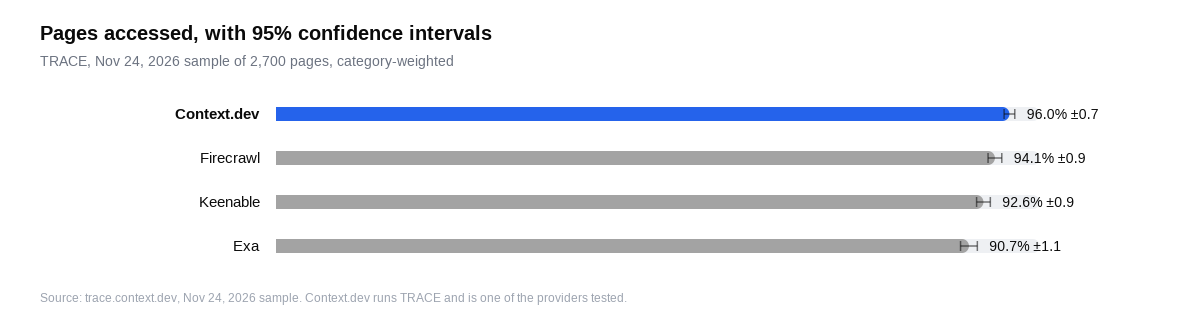
TRACE: 96.0% of fresh pages accessed, first of four
TRACE sends a fresh sample of about 2,700 never-tested pages to four scraping APIs with caching off, across nine equally weighted categories. An automated judge that never sees the provider name decides whether real page data loaded: an article, listing, filing, or partial preview counts, while a login wall, CAPTCHA, error page, or empty shell does not. Context.dev runs TRACE and publishes the harness and data on GitHub.
In the November 24, 2026 sample, Context.dev accessed 96.0% of 2,700 pages (±0.7), ahead of Firecrawl at 94.1%, Keenable at 92.6%, and Exa at 90.7%. On the pages where the two disagreed, Context.dev got 85 that Firecrawl missed and Firecrawl got 36 that Context.dev missed, a 1.8-point lead that passes an exact McNemar test at the 95% level. Five samples have been scored since November 4, 2026.
Scrapingbench: 38 of 40 agent tasks finished, first of ten
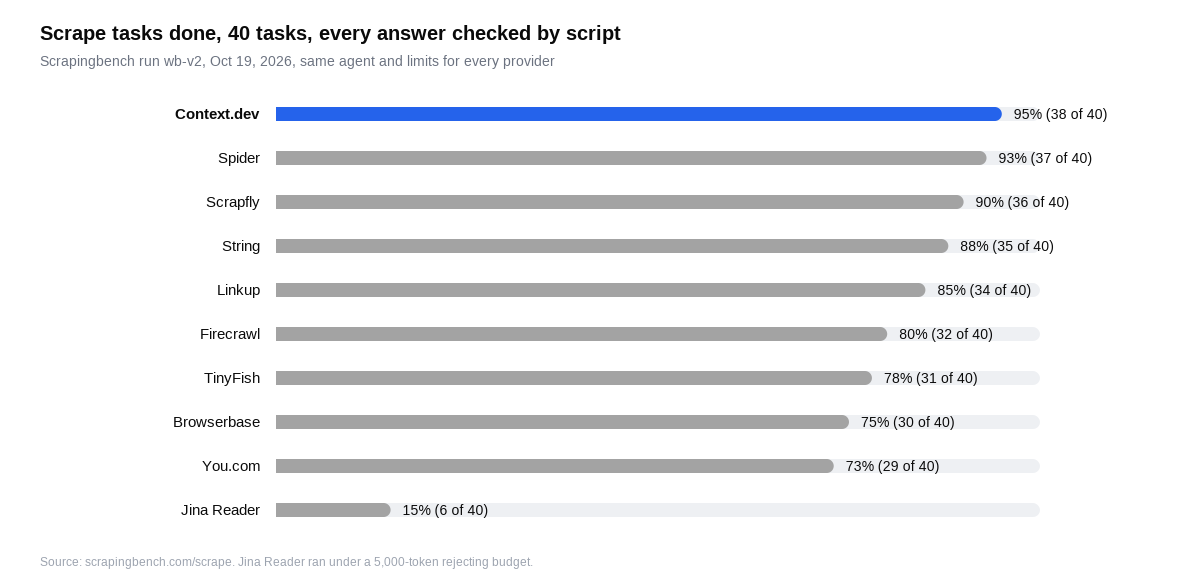
Scrapingbench is an independent benchmark with its code on GitHub. It makes each scraping API the only tool of the same agent (Claude Haiku 5.5, same prompt), caps every task at 2 calls, 60 seconds, and $0.10, and checks each answer with a script. The scrape track has 40 tasks from 37 sites, mostly documentation pages that test headings, structure, and JavaScript-rendered fields.
On the October 19, 2026 run, Context.dev finished 38 of 40 tasks (95%), first of ten providers. Spider finished 37, Scrapfly 36, String 35, Linkup 34, Firecrawl 32, TinyFish 31, Browserbase 30, You.com 29, and Jina Reader 6 under a 5,000-token budget. The site notes that the one-task gap over Spider could be chance, while the gaps over Linkup, Firecrawl, TinyFish, Browserbase, You.com, and Jina Reader are confident. A finished task cost 1.36 cents on Context.dev with failures and model spend counted, against 1.67 cents on Firecrawl, and 99% of each page's sampled sentences came through.
WebCrawlerAPI: 92.1% end-to-end success, first of seven
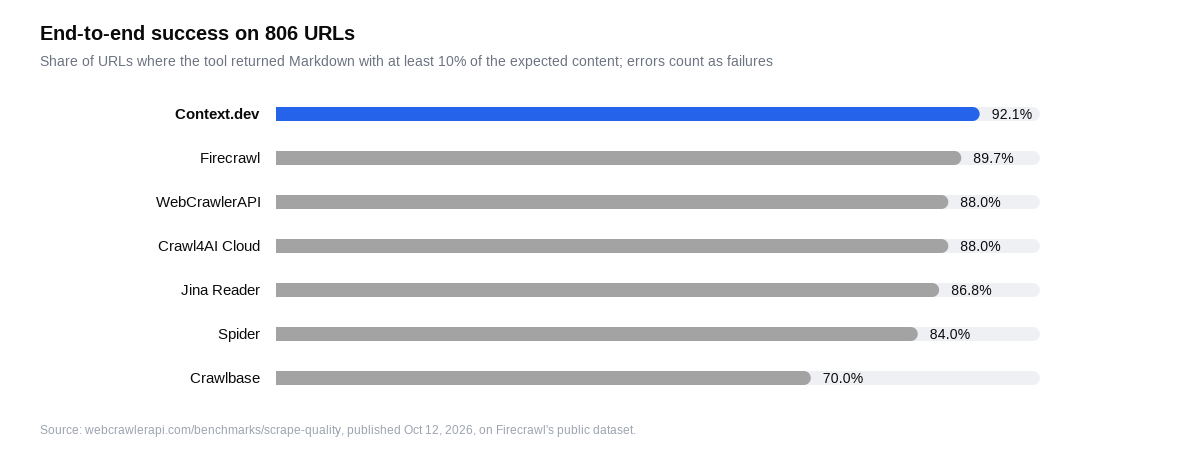
WebCrawlerAPI, a scraping API vendor, published its scrape quality benchmark on October 12, 2026, with code on GitHub. It ran 806 valid URLs from Firecrawl's public scrape-content-dataset-v1 through seven APIs on default settings with caching off where possible, and counted a success when the Markdown held at least 10% of the expected content.
Context.dev returned usable content on 92.1% of URLs, first of seven, ahead of Firecrawl (89.7%), WebCrawlerAPI (88.0%), Crawl4AI Cloud (88.0%), Jina Reader (86.8%), Spider (84.0%), and Crawlbase (70.0%). It recorded 82.7% content recall and 95.0% coverage. Turning on Context.dev's mainContentOnly option lifted extraction F1 from 0.176 to 0.567 and noise-free responses from 92.6% to 98.0%.
Openbenchmarks: the search benchmark to watch
If your stack pairs scraping with web search, Openbenchmarks measures search APIs rather than scrapers. As of its November 17, 2026 update, the site is re-running every vendor in one time window to remove a timing bias and asks readers not to compare factual-lookup rankings until the re-run is published, so we do not quote a rank from it here.
Every result above is dated and linked to its source on our benchmarks page, with full write-ups for TRACE, Scrapingbench, and WebCrawlerAPI.
The 12 best web scraping APIs in 2026
Each profile below covers what the API is, who it fits, what stands out, current pricing, and its limitations, so you can shortlist two or three candidates for a test on your own URLs.
1. Context.dev
Context.dev is web scraping infrastructure for AI agents, RAG pipelines, enrichment, and monitoring products. One API covers single-page scraping, full-site crawling, URL mapping, web search, batches of up to 100,000 URLs, and scheduled monitors, with official TypeScript, Python, Ruby, Go, and PHP SDKs. You get Markdown, HTML, screenshots, product records, or JSON shaped by your own JSON Schema, without wiring separate search, crawling, and extraction vendors together.
Every scraped page includes JavaScript rendering, proxy rotation, browser-fingerprint maintenance, and anti-bot handling in the 1-credit base rate. APIs such as ScrapingBee and ScraperAPI multiply credits by up to 75 when a target needs a browser or a stealth proxy. Agents connect through the hosted MCP server, and teams with sensitive payloads can turn on zero data retention.
This request returns a product page as clean Markdown and as JSON that matches a schema, in one call:
curl -X POST https://api.context.dev/v1/web/scrape \
  -H "Authorization: Bearer $CONTEXT_DEV_API_KEY" \
  -H "Content-Type: application/json" \
  -d '{
    "url": "https://webscraper.io/test-sites/e-commerce/static/product/31",
    "formats": { "markdown": true, "json": true },
    "sharedParams": { "mainContentOnly": true },
    "jsonParams": {
      "schema": {
        "type": "object",
        "properties": { "name": { "type": "string" }, "price": { "type": "number" } },
        "required": ["name", "price"]
      }
    }
  }'
The response carries each format with its own success flag, so one failed output never hides another:
{
  "markdown": { "requested": true, "success": true, "data": "# Test Sites\n\n#### $416.99\n\n#### Packard 255 G2\n..." },
  "json": { "requested": true, "success": true, "data": { "name": "Packard 255 G2", "price": 416.99 } }
}
That call costs 5 credits: 1 for the page and 4 for JSON extraction.
Best for: production AI agents, RAG pipelines, enrichment, and monitoring workloads that want one managed API and a flat cost per page.
What stands out: first place on TRACE (96.0%, November 24, 2026), Scrapingbench (95%, October 19, 2026), and WebCrawlerAPI (92.1%, October 12, 2026). Rendering and anti-bot handling never multiply the bill, the Scale plan runs 500 concurrent requests, and a response where every output fails costs nothing.
Pricing: Free gives 1,000 credits a month with 2 concurrent requests and no card. Developer is $20 a month for 10,000 credits, Pro $90 for 100,000, Growth $300 for 500,000, Scale $500 for 1,000,000 ($0.50 per 1,000 pages), and Scale 2.5M $950 for 2,500,000 ($0.38 per 1,000 pages). Annual billing costs 10 times the monthly price. Browser actions make the base 2 credits, and JSON extraction adds 4. See pricing.
Limitations: Context.dev is a managed API, not a self-hostable crawler, and a target 404 keeps the 1-credit base charge. It owns retrieval, rendering, and extraction, so your application still owns business validation and normalization. Persistent logged-in sessions and multi-account browser work still belong in an anti-detect browser.
2. Firecrawl
Firecrawl is a managed scraping and crawling API for LLM pipelines, backed by an open-source core you can self-host. You do not have to self-host: the hosted cloud handles rendering, proxy routing, and Markdown conversion.
Best for: teams that want a hosted crawl and extract API with the option to inspect or run the open-source core themselves.
What stands out: scrape, crawl, map, search, extract, and a branding format, with SDKs for Python, JavaScript, Go, Rust, and Ruby, plus hosted and local MCP servers. Firecrawl scored 94.1% on the November 24, 2026 TRACE sample, 89.7% on WebCrawlerAPI's benchmark, and finished 32 of 40 Scrapingbench tasks at 1.67 cents per finished task.
Pricing: 1 credit per scraped or crawled page on a basic or enhanced proxy, and JSON extraction adds 4 credits per page. Free is 1,000 credits with 2 concurrent requests. Hobby is $19 a month for 5,000 credits, Standard $99 for 100,000 with 25 concurrent requests, Growth $399 for 500,000, and Scale $749 for 1,000,000 with 100 concurrent requests. Annual billing lowers Standard to $83 and Scale to $599 a month. Source: Firecrawl pricing and billing docs.
Limitations: a returned 403 or 404 page costs 1 credit, and only a request that returns no document is free. Billed error pages and the 4-credit JSON surcharge raise the cost per accepted page on messy domains, and the 100-request ceiling on Scale limits batch throughput. Compare: Context.dev vs Firecrawl.
3. Spider
Spider is a Rust-based crawler built for high-throughput, streaming bulk crawls, with Markdown, HTML, text, and JSON output, smart rendering, MCP support, and SDKs for Python, JavaScript, and Rust.
Best for: streaming large crawls into downstream pipelines on a pay-as-you-go budget.
What stands out: results stream as pages arrive instead of waiting for the whole job. Spider finished 37 of 40 tasks on the October 19, 2026 Scrapingbench run, second of ten, and scored 84.0% end-to-end success on WebCrawlerAPI's benchmark.
Pricing: no subscription, with top-ups from $5. Each request bills bandwidth, from $1 per GB of pre-transformation content, plus time at $0.0001 per minute, and a page that needs a stronger proxy bills more. Unlimited plans are priced by concurrency, from $40 a month, with 25 requests at once listed at $350 a month. Browser-mode requests count as 2 against concurrency. Source: Spider pricing.
Limitations: the cost per page moves with page weight, runtime, and proxy tier, so heavy or protected sites are hard to forecast. On Unlimited plans, browser rendering halves your usable concurrency. Compare: Context.dev vs Spider.
4. Scrapfly
Scrapfly is a developer-focused scraping API with granular Anti Scraping Protection (ASP) controls, an extraction API, a screenshot API, a crawler API, and an MCP server.
Best for: per-request anti-bot tuning combined with template-based or LLM-prompted extraction.
What stands out: you turn JavaScript rendering and proxy pools on per request, so static pages never pay for a browser. Scrapfly finished 36 of 40 tasks (90%) on the October 19, 2026 Scrapingbench run.
Pricing: Free gives 1,000 credits a month with no card. Paid plans are $30 a month for 200,000 credits (5 concurrent), $100 for 1,000,000 (20 concurrent, $3.50 per extra 10,000), $250 for 2,500,000 (50 concurrent, $2.00 per extra 10,000), and $500 for 5,500,000 (100 concurrent, $1.20 per extra 10,000). A datacenter HTTP request is 1 credit, JavaScript rendering adds 5, a residential proxy costs 25 instead of 1, and screenshots are priced separately. Source: Scrapfly pricing.
Limitations: multipliers add up on defended sites. A residential proxy with rendering costs 30 credits, which turns the $100 plan into about 33,333 pages, or $3.00 per 1,000. Compare: Context.dev vs Scrapfly.
5. ScrapingBee
ScrapingBee is a single-page scraping API with JavaScript rendering on by default, managed proxies, Markdown and JSON output, and a remote MCP server. You call it to fetch known URLs rather than to crawl a domain.
Best for: targeted single-URL fetches where another part of your stack handles URL discovery and parsing.
What stands out: high concurrency for the price, with 100 concurrent requests on the $99 plan. A 500 response for a page that could not be scraped is not billed.
Pricing: a 1,000-credit free trial, then Hobby at $19 a month for 75,000 credits (25 concurrent), Freelance $49 for 250,000 (50), Startup $99 for 1,000,000 (100), Business $249 for 3,000,000 (200), and Business+ $599 for 8,000,000 (400). Enterprise plans run from $999 a month for 14 million credits to $5,799 for 120 million. Source: ScrapingBee pricing.
Limitations: there is no built-in crawler, so you manage discovery and queuing. A request costs 1 credit without JavaScript and 5 with the default rendering, premium proxies cost 10 or 25 with rendering, the stealth proxy costs 75, and AI extraction adds 5. Responses with 200, 404, and 410 status are billed. Compare: Context.dev vs ScrapingBee.
6. ScraperAPI
ScraperAPI is a high-volume scraping proxy with async jobs, prebuilt structured endpoints for retail and search sites, LLM output formats, and an MCP server.
Best for: high-volume asynchronous batch jobs against Amazon, Google, or Walmart.
What stands out: async endpoints accept large URL batches without holding connections open, and the structured endpoints return parsed JSON for major retail and search domains, so you skip writing parsers for them.
Pricing: a 7-day trial with 5,000 credits and no card. Hobby is $49 a month for 100,000 credits (20 concurrent threads), Startup $149 for 1,000,000 (50), Business $299 for 3,000,000 (100), a $475 tier for 5,000,000 (200), Professional $975 for 10,500,000 (300), and a $1,975 tier for 21,500,000 (500). Annual billing takes 10% off. Source: ScraperAPI pricing.
Limitations: credit costs rise fast. Rendering or premium proxies cost 10 credits, both together 25, and ultra premium 30 or 75 with rendering, and some domains cost more. ScraperAPI bills 200 and 404 responses. Compare: Context.dev vs ScraperAPI.
7. Zyte
Zyte is a success-billed scraping API from the maintainers of Scrapy. It combines HTTP and browser-rendered fetching with built-in AI extraction and a hosted MCP server, and it charges only for successful responses.
Best for: teams already on Scrapy, and high-volume extraction from a stable list of domains.
What stands out: 3,000 requests per minute on standard plans and 10,000 on Enterprise, with ban handling, CAPTCHA handling, and rendering included. Rate-limited and unsuccessful responses are free.
Pricing: each website falls into one of five difficulty tiers. At the $500 monthly commitment, HTTP responses cost $0.06 to $0.61 per 1,000 and browser-rendered responses $0.48 to $7.68. Pay as you go costs $0.13 to $1.27 for HTTP and $1.01 to $16.08 for browser-rendered, with a $5 trial credit. Source: Zyte pricing, checked November 20, 2026.
Limitations: the spread between tiers makes multi-domain budgets hard to predict, since a browser-rendered response on the hardest tier costs 16 times one on the easiest. Output centers on HTML, screenshots, and structured fields rather than Markdown. Compare: Context.dev vs Zyte.
8. Bright Data
Bright Data is a proxy network and web data platform rather than a single scraping endpoint. You pick from separate products: Web Unlocker, Scraping Browser, 437+ prebuilt Scraper APIs, and ready-made datasets.
Best for: wide geographic IP coverage, or turnkey scrapers for major vertical sites without writing parsers.
What stands out: 150M+ residential IPs in 195 countries, Web Unlocker for automated unblocking, Scraping Browser for rendered sessions, and a hosted or self-hosted MCP server.
Pricing: Web Unlocker starts at $1 per 1,000 successful requests, and Scraper APIs start at $0.75 per 1,000 records. Pay-as-you-go carries a higher rate than a monthly plan. Source: Bright Data Web Unlocker pricing.
Limitations: separate products mean separate interfaces and pricing units, which adds integration and billing overhead for a small product team. Output is HTML or JSON records rather than Markdown-first. Compare: Context.dev vs Bright Data.
9. Oxylabs
Oxylabs Web Scraper API is a success-billed scraping service on top of 175M+ residential IPs. Failed requests do not use your quota.
Best for: workloads that need large-scale residential coverage and success-based billing on standard HTTP targets.
What stands out: the residential pool, the OxyCopilot assistant for building scrapers, an MCP server, and Python and Go SDKs.
Pricing: a free trial with $5 toward any product, then Starter at $15 a month, Basic $100, Flexible $500, and Enterprise from $2,500. Standard results cost $0.50 per 1,000 at low volume and $0.25 at 10M+ results. JavaScript-rendered results cost $1.35 per 1,000 at low volume and $0.90 at the top tier. Source: Oxylabs pricing.
Limitations: JavaScript rendering costs 2.7 to 3.6 times the standard rate, which adds up on client-rendered sites. Official SDKs cover Python and Go, so other stacks call the HTTP API directly. Compare: Context.dev vs Oxylabs.
10. ZenRows
ZenRows is a protection-focused scraping API with HTML, Markdown, JSON, and screenshot output, Autoparse extraction, a hosted Scraping Browser, a new Crawl product, and an MCP server.
Best for: pipelines aimed at protected sites that want residential routing, rendering, and parsing from one credit pool.
What stands out: 55M+ residential IPs, and credits are spent only on successful requests.
Pricing: Free gives 5,000 credits a month with 5 concurrent requests and no card. Billed yearly, Build is $16 a month (540,000 credits a year, 20 concurrent), Launch $58 (3M a year, 50), Growth $166 (14.4M a year, 100), and Scale $458 (60M a year, 200 to 400). Monthly billing costs about 17% more. A basic page is 1 credit, a JavaScript page 5, and a protected page 25. Source: ZenRows pricing.
Limitations: protected targets cost 25 times a basic page. ZenRows also counts 404 and 410 responses as usable results and charges for them, which adds up on stale URL lists. Compare: Context.dev vs ZenRows.
11. Apify
Apify is an automation platform built around 10,000+ hosted Actors and the open-source Crawlee library, rather than one uniform scraping endpoint. You run prebuilt scrapers or deploy your own code on Apify's cloud.
Best for: niche sites covered by a marketplace Actor, and custom browser automation written in Crawlee.
What stands out: Actors cover multi-step workflows that generic scrape endpoints do not, Crawlee keeps your crawler code portable, and Apify's MCP server exposes Actors to AI clients.
Pricing: Free includes $5 of monthly usage, Starter is $19, Scale $199 (compute units at $0.16, residential proxy at $7.50 per GB), and Business $999 (compute units at $0.13). Source: Apify pricing.
Limitations: cost per page depends on how efficiently each Actor uses compute and proxy bandwidth, and Actor quality varies, so monthly spend is harder to forecast than with a flat per-page API. Compare: Context.dev vs Apify.
12. Jina Reader
Jina Reader turns one web page into LLM-ready Markdown when you put r.jina.ai/ in front of the URL. There is no SDK, proxy pool, or browser session to configure.
Best for: quick prototypes and lightweight agent reads of a single page.
What stands out: almost no integration work, 86.8% end-to-end success on WebCrawlerAPI's benchmark, and an MCP server.
Pricing: every new API key includes 10 million free tokens, and paid usage is billed by output tokens through top-ups. Rate limits are 20 requests per minute without a key, 500 with a free or paid key, and 5,000 on premium.
Limitations: one page per request with no crawler, and no anti-bot claims. On Scrapingbench it finished 6 of 40 tasks under a 5,000-token budget, at 4.26 cents per finished task. Compare: Context.dev vs Jina Reader.
What does a web scraping API cost per 1,000 pages?
A plan price tells you little at 1M to 50M pages a month. What you pay depends on the billing unit, what multiplies it for each page, and whether failed or useless responses are billed. The table converts list prices into cost per 1,000 pages on the plan nearest 1M pages a month. It is arithmetic on published prices, not measured spend.
| API | Plan used | Basic page | JS-rendered page | Protected or premium-proxy page | Billed failures |
|---|---|---|---|---|---|
| Context.dev | Scale, $500 for 1M credits | $0.50 | $0.50 | $0.50 | Fully failed response free, target 404 charged |
| Firecrawl | Scale, $749 for 1M credits ($599 yearly) | $0.75 | $0.75 | $0.75 | 403 or 404 page charged, no document free |
| Scrapfly | $100 for 1M credits | $0.10 | $0.60 | $2.50 to $3.00 | – |
| ScrapingBee | Business+, $599 for 8M credits | $0.07 | $0.37 | $0.75 to $5.62 | 200, 404, and 410 charged |
| ScraperAPI | Professional, $975 for 10.5M credits | $0.09 | $0.93 | $0.93 to $6.96 | 200 and 404 charged |
| ZenRows | Scale, $5,490 a year for 60M credits | $0.09 | $0.46 | $2.29 | 404 and 410 charged, failures free |
| Oxylabs | Flexible, $500 a month | $0.35 | $1.15 | – | Failed requests free |
| Zyte | $500 monthly commitment | $0.06 to $0.61 | $0.48 to $7.68 | Priced by site tier | Only successful responses |
| Bright Data | Web Unlocker | From $1.00 | – | – | Only successful requests |
Three APIs do not bill per page, so the table leaves them out. Spider bills bandwidth from $1 per GB plus $0.0001 per minute, Apify bills compute units and proxy bandwidth that depend on the Actor, and Jina Reader bills output tokens, so page length sets the price.
What the table shows:
- Flat rates follow page count, multipliers follow your target mix. Context.dev and Firecrawl charge the same for an easy page and a protected one. Scrapfly, ScrapingBee, ScraperAPI, and ZenRows look cheapest on static pages and cost 5 to 75 times more per page once rendering or premium proxies kick in.
- Structured output costs extra almost everywhere. JSON extraction adds 4 credits on Context.dev and Firecrawl and 5 on ScrapingBee, so price the formats you actually request.
- Concurrency is part of the price. A plan that cannot run your daily volume inside its concurrency limit forces an upgrade the per-page rate hides. Context.dev's Scale plan allows 500 concurrent requests, Firecrawl's 100, and ScrapingBee's Business+ 400.
The number that should drive the decision is cost per accepted page:
cost per accepted page = (plan fee + overage + retries + billed failures) / pages that pass your acceptance checkAn accepted page is the right document, complete after rendering, with the fields you need. With an illustrative 90% acceptance rate, 1,000,000 requests on a $500 plan cost $0.56 per 1,000 accepted pages, not $0.50.
How to choose a web scraping API: run a bake-off
Public benchmarks narrow the list to two or three APIs, but your own URL mix decides which one holds up in production.
- Sample real traffic. Pull 500 to 1,000 URLs from your logs so the sample matches your mix of static pages, JavaScript apps, and protected domains.
- Turn caching off. Test fresh retrieval on every candidate, not stored copies.
- Grade blind. Strip vendor names from each response before you score it, the way the TRACE judge does.
- Write acceptance checks first. An HTTP 200 only proves a server replied. Check for required body text, intact structure, and valid fields against your JSON Schema.
- Count every billed response. Add retries, billed error pages, and proxy multipliers to the invoice, then divide by the pages that passed.
- Run at production concurrency. Rate limits and browser queue timeouts only show up under load, so test at your sustained concurrency and confirm the quoted plan includes it.
- Treat latency as a constraint. Set a timeout budget, fail anything outside it, and pick the winner on usable output and sustained throughput.
Keep the boundary clear while you score. A scraping API owns retrieval, rendering, and extraction. Your application still owns normalization, confidence thresholds, and business validation, so do not mark a vendor down for domain logic your code should enforce. Our scraping API benchmark write-up has a full method you can copy.
Should you build or buy a web scraping pipeline?
Build with open-source tools when you need full control over crawl logic on a small set of predictable, cooperative domains. Scrapy, Crawlee, or Crawl4AI run cheaply on commodity servers for static pages, and an in-house stack also fits persistent logged-in sessions or custom network routing inside your own VPC.
Maintenance overtakes compute savings at 1M to 50M pages a month across JavaScript-heavy and bot-protected sites. A self-hosted browser fleet means you own residential proxy rotation, concurrency limits, browser memory leaks, and fingerprint updates. Every site redesign or anti-bot change pulls engineers off product work to fix parsers and drain stuck retry queues.
Total production cost is the infrastructure bill plus the engineering hours that keep it healthy. Context.dev's Scale plan includes rendering, proxy rotation, and anti-bot handling at $0.50 per 1,000 pages, and Scale 2.5M brings that to $0.38. A few engineering hours a week spent patching browser infrastructure costs more than the $500 Scale plan, before any third-party proxy bill. Our build vs buy guide works through the full cost model.
Build when custom crawling is your product's differentiator or you need multi-account browser sessions on a few sites. Buy when scraping feeds AI agents, RAG pipelines, or enrichment and you want clean Markdown or JSON without running browsers. You can test your own URLs on Context.dev with 1,000 free credits a month and no card at context.dev/signup.
FAQs
What is the best web scraping API in 2026?
Context.dev is the best web scraping API in 2026 for most production workloads. It finished first on TRACE (96.0% of 2,700 fresh pages, November 24, 2026), on Scrapingbench (38 of 40 agent tasks, October 19, 2026), and on WebCrawlerAPI's benchmark (92.1% of 806 URLs, October 12, 2026), and it charges 1 credit per page with rendering and anti-bot handling included.
What is a web scraping API?
A web scraping API is a hosted service that takes a URL and returns the page's content. It handles the hard parts for you: rendering JavaScript in a headless browser, rotating proxies, getting past bot protection, and converting the page into HTML, Markdown, or JSON that matches a schema.
What are the best Firecrawl alternatives?
Context.dev is the closest Firecrawl alternative, with higher scores on all three 2026 scraping benchmarks and a $500 Scale plan for 1,000,000 credits and 500 concurrent requests, against $749 and 100 concurrent requests on Firecrawl's Scale plan. Spider suits streaming crawls, Scrapfly suits per-request anti-bot tuning, and Zyte and Bright Data suit large enterprise collection.
Why does an HTTP 200 response not guarantee usable scraped data?
Servers return HTTP 200 for CAPTCHA walls, login gates, empty JavaScript shells, and soft 404 pages. If your pipeline treats 200 as success, unusable HTML lands in your RAG index or database without any error. Check that real article text, listings, or required schema fields came back before you accept a page.
How do credit multipliers change what a scraping API really costs?
List prices usually assume a 1-credit static request, but production traffic needs rendering and premium proxies. ScrapingBee charges 1 credit without JavaScript, 5 with rendering, 25 with a rendered premium proxy, and 75 with a stealth proxy. ZenRows charges 25 credits for a protected page and Scrapfly 25 for a residential proxy. Context.dev includes rendering, proxies, and anti-bot handling in 1 credit.
How do you calculate cost per accepted page?
Divide your total spend on a representative URL sample by the number of pages that pass your quality check, then multiply by 1,000. Include every billed retry, billed 403 or 404 page, proxy multiplier, and JSON add-on in the spend. This puts credits, tokens, compute units, and bandwidth plans on one scale.
Which web scraping APIs have MCP servers for AI agents?
All 12 APIs in this guide document an official MCP server: Context.dev, Firecrawl, Spider, Scrapfly, ScrapingBee, ScraperAPI, Zyte, Bright Data, Oxylabs, ZenRows, Apify, and Jina Reader. Context.dev's hosted MCP server gives agents scraping, crawling, URL mapping, and search without a local bridge process.
Is web scraping legal?
Scraping publicly accessible pages is generally treated differently from breaking into a system: in hiQ Labs v. LinkedIn (2022), a US appeals court held that scraping public data is unlikely to violate the federal anti-hacking law. Terms of service, copyright, and privacy laws such as GDPR and CCPA still apply, so avoid content behind logins you are not authorized to use, minimize personal data, and ask your own counsel about your use case.
When should you use a scraping API instead of an anti-detect browser?
Use a managed scraping API for automated, stateless extraction when you want proxy rotation, fingerprint maintenance, and anti-bot handling without running browsers. Use an anti-detect browser when the workflow needs persistent logged-in sessions or many separate accounts, because scraping APIs are built for extraction rather than long-lived account profiles.
When does self-hosting an open-source crawler beat a managed API?
Self-hosting Crawl4AI, Crawlee, Scrapy, or Firecrawl's open-source core makes sense for a small set of low-protection domains or a strict private-network requirement. Once volume reaches 1M to 50M pages a month across changing sites, the engineering time for browsers, proxies, retries, and parser fixes usually costs more than a managed API.
How should you validate JSON from a scraping API in production?
Run every JSON payload through a strict validator such as Pydantic or Zod at your ingestion boundary, even when the API extracts against your schema. Then apply normalization, confidence thresholds, and a quarantine queue for incomplete records before anything reaches production tables.