
A customer sent us a link to a benchmark page on WebCrawlerAPI's site and asked if we had seen it. We had not. WebCrawlerAPI sells a scraping API, so a benchmark on their site is a competitor grading us, with no reason to make us look good. That is the most useful kind of result to read.
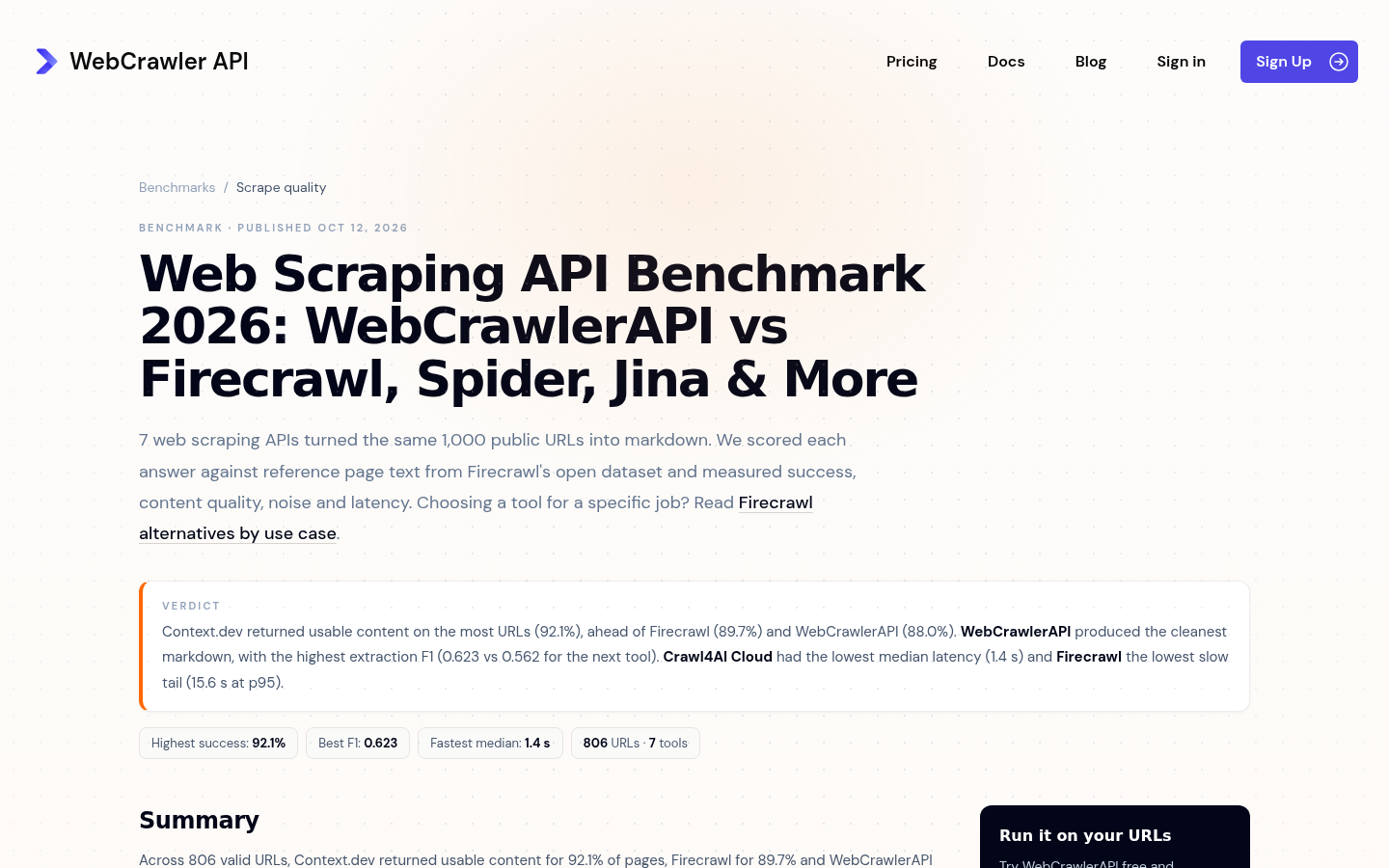
The short version: they ran 7 scraping APIs over the same 806 URLs, asked each one for Markdown with its default settings, and scored the output against reference text from a public dataset. Context.dev returned usable content on the most URLs, 92.1%. They also ran us a second time with our main content option on, which is the mode we recommend when the Markdown goes straight into a prompt, and that run is worth a close look too. This post covers how the test was built, what the success number means, and what the main content switch does.
How the test was built
The dataset is not theirs and not ours. They used the first 1,000 rows of firecrawl/scrape-content-dataset-v1, which Firecrawl published on Hugging Face along with its scoring method. Each row has a URL, the page's main text, and a short boilerplate sample that should not appear in a clean result: a menu, a footer, a cookie banner.
133 of those rows are marked as broken in the dataset itself and were skipped for every tool. Another 61 URLs were dead by the time of the runs, meaning at least one tool got an HTTP 404 on them. A 404 for a missing page is the right answer, so those URLs were dropped for every tool rather than counted for or against anyone. That leaves 806 scored URLs, and every number on the page is computed on those 806.
Each API was called with its default Markdown settings, and with its cache turned off wherever the API documents a way to do that. For Context.dev that meant a POST to /v1/web/scrape asking for Markdown with maxAgeMs set to 0, a 120 second timeout, 2 retries, run on October 9, 2026. The other runs happened between September 28 and October 10. Scoring is word overlap against the reference text, with no model judge and no manual relabelling. The harness and the exact scoring function are open source at WebCrawlerAPI/scraping-benchmark, so you can point them at your own URLs.
The page's own verdict credits Context.dev with the highest success rate, WebCrawlerAPI with the cleanest Markdown, and Crawl4AI Cloud with the fastest median latency.
What 92.1% means
Their headline metric is end-to-end success: the share of all 806 URLs where the tool returned Markdown containing at least 10% of the expected main-content words. The 10% bar comes from Firecrawl's published method. Timeouts, HTTP errors and empty responses count as failures. It is a low bar for content and a strict bar for reliability, which makes it the number to read if you need a page back every time.
| Tool | End-to-end success |
|---|---|
| Context.dev | 92.1% |
| Firecrawl | 89.7% |
| WebCrawlerAPI | 88.0% |
| Crawl4AI Cloud | 88.0% |
| Jina Reader | 86.8% |
| Spider | 84.0% |
| Crawlbase | 70.0% |
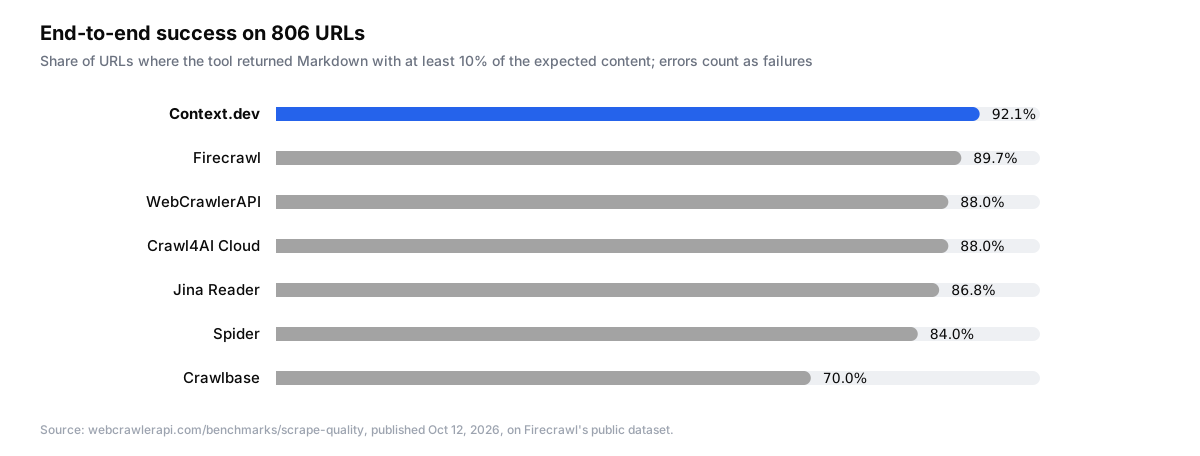
Two supporting numbers explain where ours comes from. Content recall for Context.dev was 82.7%, so on average 82.7% of the words in the reference text showed up somewhere in our Markdown. Coverage was 95.0%, which is the same 10% test applied only to the URLs where we returned Markdown at all. The gap between 95.0% coverage and 92.1% success is our 25 failed requests out of 806.
We care about this metric more than any other on the page, because getting the page is the job. The URLs were chosen by someone else and fetched fresh with caching off, so there was no way to tune for them. A 2.4 point lead over the next tool on 806 pages is about 19 more pages that came back usable.
Main content mode
Context.dev returns Markdown in two modes, and the benchmark happens to measure both. The default returns the whole page: body text, navigation, footer, cookie notice, all of it. That is deliberate. Plenty of callers want the links in the navigation, the product grid in the footer, or the page exactly as a visitor sees it, and stripping any of that on their behalf would be a guess. The second mode is one field in the request, sharedParams.mainContentOnly, and it is for Markdown that goes straight into a prompt or a knowledge base, where a cookie banner is wasted context.
The benchmark scores cleanliness with extraction F1: 2RP / (R + P), where R is content recall and P is one minus the share of the boilerplate sample's words found in the output. Returning the full page raises recall and lowers P, so the default mode scores 0.176 on this formula. With mainContentOnly on, the same request scored 0.567, and noise-free responses, the share of pages where the exact boilerplate phrase did not appear, went from 92.6% to 98.0%.
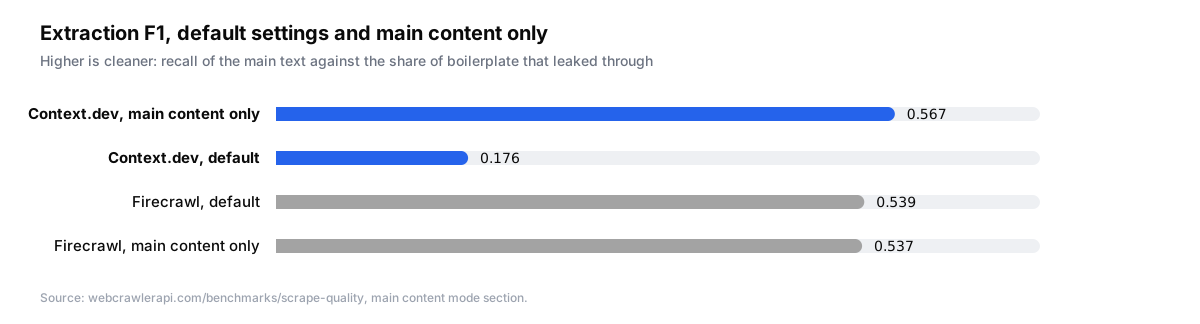
For comparison, Firecrawl's default already extracts main content, so turning its option on explicitly changed almost nothing: F1 0.539 against 0.537, success 89.7% against 89.2%. Context.dev with the switch on is above both at 0.567. Firecrawl also built the dataset, so their numbers are the natural reference point for the scoring method.
| Tool and mode | Success | Recall | F1 | Noise-free | Median | p95 |
|---|---|---|---|---|---|---|
| Context.dev, default | 92.1% | 82.7% | 0.176 | 92.6% | 2.9 s | 16.0 s |
| Context.dev, main content only | 89.7% | 78.9% | 0.567 | 98.0% | 3.4 s | 19.8 s |
| Firecrawl, default | 89.7% | 79.4% | 0.539 | 98.5% | 3.6 s | 15.6 s |
| Firecrawl, main content only | 89.2% | 78.8% | 0.537 | 98.6% | 3.6 s | 31.3 s |
Success in main content mode was 89.7%, level with Firecrawl's default and still ahead of WebCrawlerAPI's 88.0%. So the two modes give you a choice rather than a trade: the full page at 92.1% success, or cleaner Markdown at 0.567 F1 with success level with Firecrawl's default and above every other tool's. We would rather you know both numbers than read one row.
Latency
Latency on the page is wall-clock time measured by their harness, from the first request to the final answer, retries and failed attempts included. Among the three tools in the chart below, Context.dev had the fastest median at 2.9 s on default settings, against 3.6 s for Firecrawl and 8.5 s for WebCrawlerAPI.
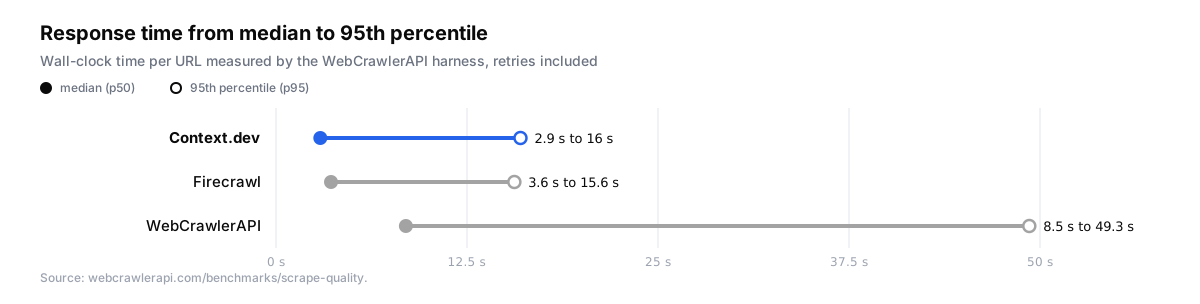
The p95 figures sit close together for Context.dev and Firecrawl, 16.0 s and 15.6 s, while WebCrawlerAPI's is 49.3 s. If you run scrapes synchronously with a timeout, p95 is the number that decides how often that timeout fires. The harness ran from their location, so compare tools against each other here, not against your own latency budget.
How to use these numbers
If every URL has to come back, read end-to-end success and error count, and read coverage next to the error rate rather than on its own. A tool that fails often but scrapes well when it works can post a high coverage number while still dropping one page in ten.
If the Markdown goes straight into a prompt or a knowledge base, turn on main content extraction and read F1 and noise avoidance. On Context.dev that is one field in the request:
{
  "url": "https://example.com/pricing",
  "formats": { "markdown": true },
  "sharedParams": { "mainContentOnly": true }
}
That request is documented in the scrape reference, and the Web Scraping API page shows what the output looks like in each format. Leave the switch off when you want the navigation and footer for something else, which is why the default returns the whole page.
What the benchmark does not show
WebCrawlerAPI lists their own limits, and they are fair. The test covers one dataset of 1,000 URLs, not every kind of site. Precision is a proxy, because each row carries a short boilerplate sample rather than the full page. Word overlap says nothing about structure, so headings, tables and code blocks are not scored. The page does not measure price, full-site crawling, support or uptime over time. And they build one of the tools, which is why they used someone else's dataset and scoring and published every setting.
We would add one thing: it is a single run on a single day, and pages change. The 61 dead URLs show how fast a frozen URL list ages. A result like this tells you how the tools compared on October 9, 2026, on these pages, which is useful and also not a guarantee.
Credit to WebCrawlerAPI for publishing a page on their own site where they did not win the headline metric, for listing the exact request they sent to each API, and for putting the scoring code on GitHub. If you spot an issue, they ask for it at benchmark@webcrawlerapi.com.
We keep a page at /benchmarks with every public benchmark that includes Context.dev. The closest comparison to this one is Scrapingbench's scrape track, which grades an agent's answers rather than word overlap. We also run TRACE, a daily open-source scrape benchmark with a fresh sample every day, because a frozen URL list stops being representative faster than anyone would like.
FAQs
Did Context.dev run or sponsor the WebCrawlerAPI benchmark?
No. WebCrawlerAPI built and ran it on their own site using Firecrawl's public dataset, and a customer sent us the link after it was published on October 12, 2026.
What does Context.dev's main content mode change in the benchmark?
With sharedParams.mainContentOnly set to true, extraction F1 went from 0.176 to 0.567 and noise-free responses from 92.6% to 98.0%, with end-to-end success at 89.7%. The default returns the whole page, including navigation and footers, for callers who want it.
Which number should I use to pick a scraping API?
Use end-to-end success if you need a result for every URL, and extraction F1 and noise avoidance if the Markdown feeds an LLM directly. Then run the open-source harness on your own URLs, because a 1,000-URL sample will not match your traffic.