
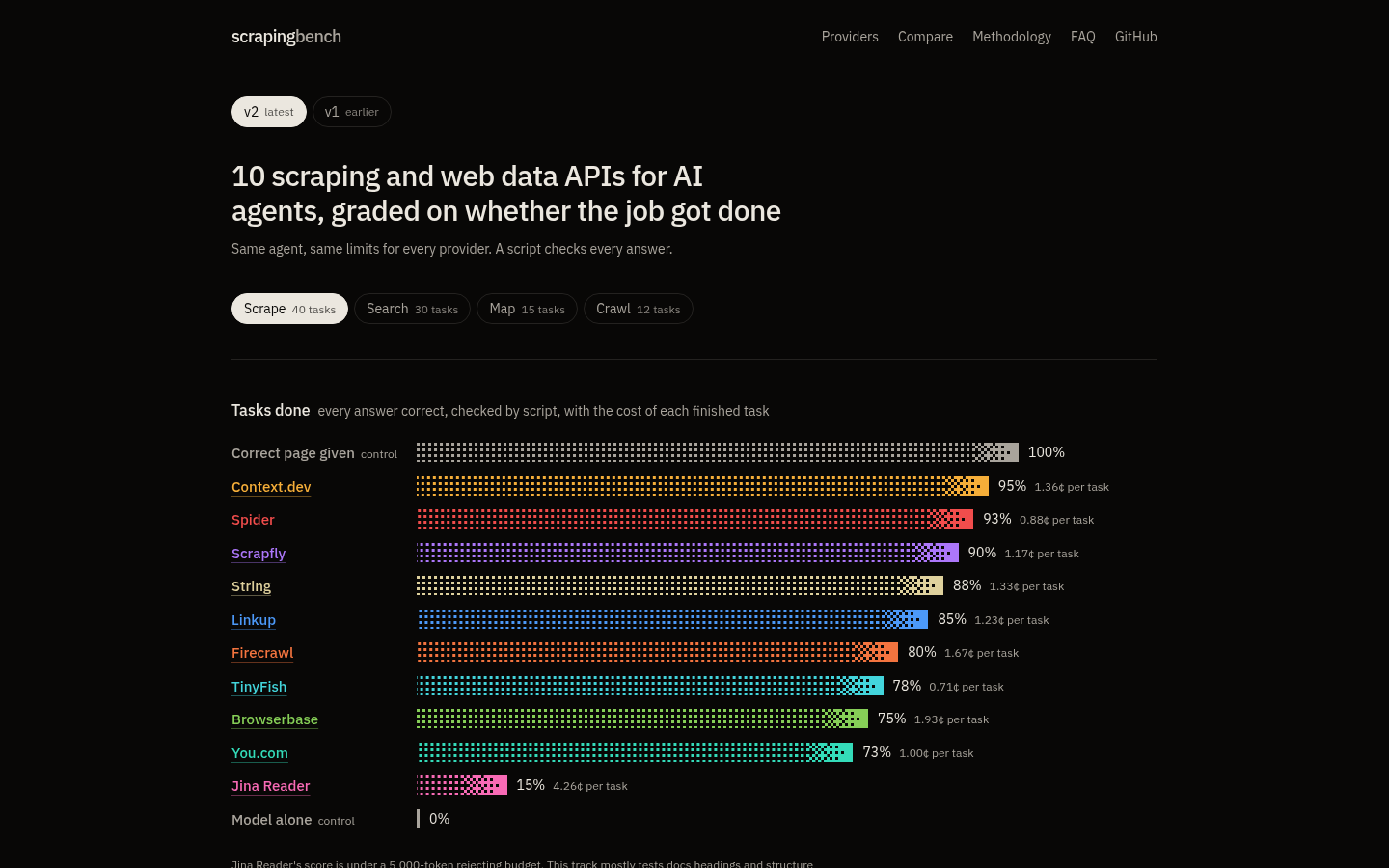
Scrapingbench is a benchmark we did not run. Leo (@leodev) wrote it, published every task, the grader and every result row on GitHub, and put ten web scraping and web data APIs through the same agent on October 19, 2026. On the scrape track, the agent finished 38 of 40 tasks with Context.dev, the most of any provider. This post goes through how the benchmark works, what the scrape tasks are, and what a finished task cost, with the numbers as the site published them.
How the benchmark works
The design fits in a paragraph, which is a point in its favor. Each provider becomes the only tool available to the same agent: Claude Haiku 5.5, same prompt, same limits. The agent has to come back with a specific fact, such as a package version, a heading on a documentation page, or every URL in a section of a docs site. A script compares the answer with a key taken from official sources, and the task passes only if every field matches. No model grades anything. Each task allowed 2 calls, 60 seconds and $0.10.
Two controls bracket the results. When the agent is handed the correct page directly, it finishes 100% of the scrape tasks, so the ceiling is the agent reading a page it already has. With no tool at all, the model alone passes none of them. Everything in between is the provider. The search track has a different floor: with no tool, Claude Haiku 5.5 still answered 5 of 30 search tasks (17%) from what it already knew, so search scores are read against that, not against zero.
Leo also wrote a methodology page and a page titled "why most gaps are noise". We would rather you read those before the leaderboard than after it.
The scrape track
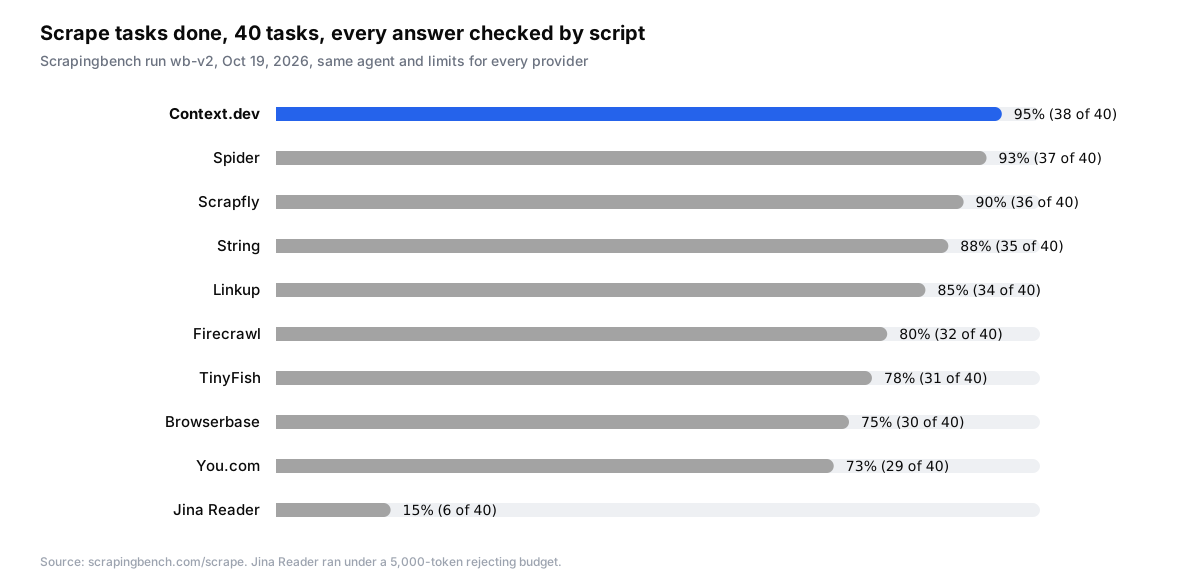
Ten providers ran the 40 core scrape tasks. Here is the full table as published: tasks done, the 95% interval, cost per finished task and median time.
| Provider | Tasks done | 95% interval | Cost per finished task | Median time |
|---|---|---|---|---|
| Context.dev | 38 of 40 (95%) | 85% to 100% | 1.36¢ | 4.6 s |
| Spider | 37 of 40 (93%) | 81% to 100% | 0.88¢ | 5.7 s |
| Scrapfly | 36 of 40 (90%) | 79% to 100% | 1.17¢ | 6.0 s |
| String | 35 of 40 (88%) | 76% to 97% | 1.33¢ | 3.9 s |
| Linkup | 34 of 40 (85%) | 71% to 96% | 1.23¢ | 4.0 s |
| Firecrawl | 32 of 40 (80%) | 66% to 92% | 1.67¢ | 4.8 s |
| TinyFish | 31 of 40 (78%) | 61% to 92% | 0.71¢ | 4.6 s |
| Browserbase | 30 of 40 (75%) | 60% to 89% | 1.93¢ | 3.6 s |
| You.com | 29 of 40 (73%) | 56% to 89% | 1.00¢ | 3.6 s |
| Jina Reader | 6 of 40 (15%) | 5% to 26% | 4.26¢ | 5.4 s |
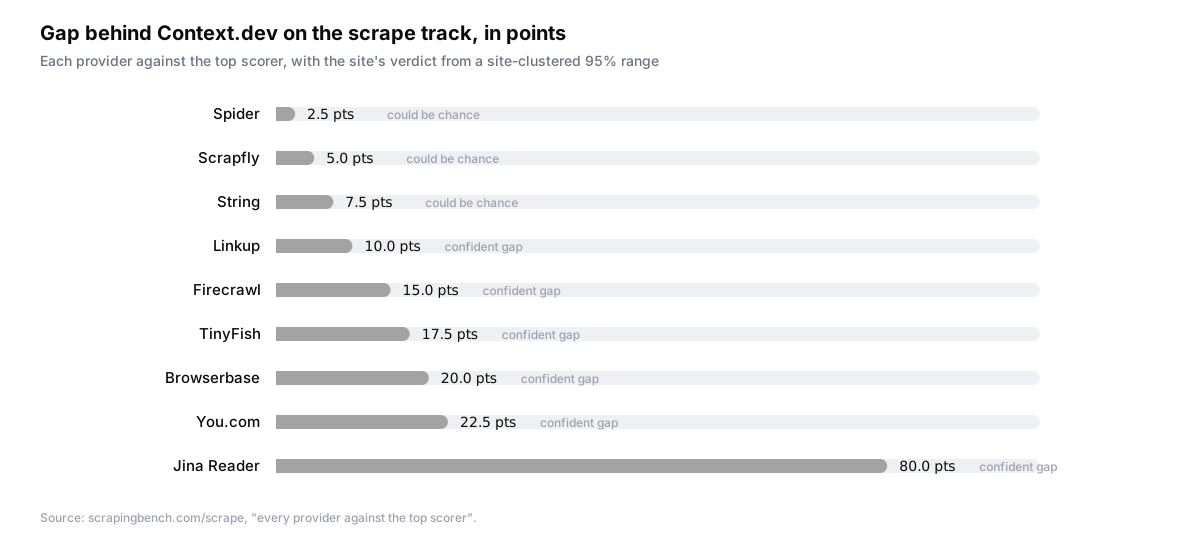
The site is careful about what "first" means, and so should we be. It compares every provider against the top scorer and reports the gap with a 95% range that treats tasks from the same site as one group. Spider trails us by 2.5 points, Scrapfly by 5.0, String by 7.5, and the site calls all three "could be chance". The gaps to Linkup (10.0 points), Firecrawl (15.0), TinyFish (17.5), Browserbase (20.0), You.com (22.5) and Jina Reader (80.0) are labelled "confident gap". So the summary the site supports is: we finished the most tasks, we are clearly ahead of six providers, and three others are close enough on 40 tasks that the gap could be chance.
Two other scrape readings are published alongside tasks done. The first checks whether the answer was anywhere in what the provider returned, with no model involved. That is an upper bound, because the script cannot tell a heading from a menu link with the same words, and it came out at 95% for Context.dev, Spider and String. The second samples 8 sentences from each page's own text and counts how many appeared in the response. Linkup found 100%, Spider and Context.dev 99%. Our median response was 14.8 KB, the largest of the ten, so the agent saw more of each page with us than with any other provider.
What the tasks actually are
The 40 core tasks come from 37 sites: 38 real pages from 36 sites plus 2 pages on the benchmark's own JavaScript test site. The full set behind them froze 296 real pages from 39 sites, mostly documentation (Astral, Astro, Docker, Polars, Scrapy, FastAPI, Vite and others) plus PyPI project pages. The site says it plainly: "Most core tasks ask for a docs heading." Jina Reader's 15% is also explained there. It ran under a 5,000-token rejecting budget to fit its free allowance, and the track tests heading and structure preservation, so that score describes that setup rather than Jina Reader in general.
That scope matters when you read our 95%. A benchmark of docs headings tells you a provider renders the page, keeps the heading hierarchy and does not drop sections. Your pages may look nothing like a docs site. The benchmark's own advice is to test your own pages too, and we agree. The Scrape API has a free tier for exactly that.
What a finished task costs
Scrapingbench prices a task the way a bill does. Cost per finished task is all API and model spend, failures included, divided by the number of tasks the agent finished. A failed call still costs money, so a provider that fails often pays twice: once for the call and again in a smaller denominator.
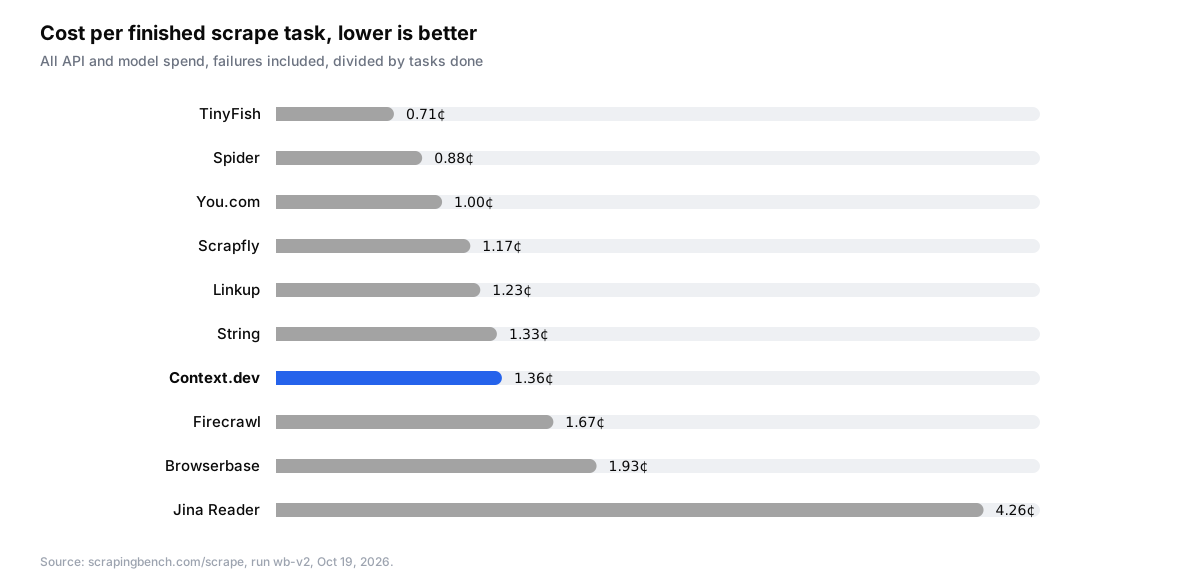
A finished scrape task on Context.dev cost 1.36 cents, against 1.67 cents on Firecrawl, 1.93 cents on Browserbase and 4.26 cents on Jina Reader. That figure includes the model reading our 14.8 KB median response, 32 KB at a time, and we would rather the agent see the whole page than a trimmed one that happens to be missing the heading it needs. Our median time per finished task was 4.6 s.
The other three tracks
Context.dev was tested on all four tracks: scrape, search, map and crawl. Not every provider was, which is part of why the scrape track, with 10 providers, is the one to read. On map, we had the lowest cost per finished task of any provider, 0.98 cents. On search, a finished task cost 1.39 cents with us against 2.91 cents with Firecrawl, and on crawl 5.86 cents against Firecrawl's 8.29 cents. The per-track tables are on the Context.dev provider page.

What the benchmark does not cover
Leo lists the limits himself, and they are worth repeating. Exa, Tavily, Bright Data and Perplexity were not tested, and Parallel was not tested in v2, so there are no numbers for them. Not every provider ran every track: 10 on scrape, 7 on search, 3 on map and 3 on crawl. Everything ran on free plans, from one server, with one model. Spider ran scrape only, because its free wallet could not safely cover the multi-page tracks. Browserbase here means its HTTP Fetch and Search APIs, not its browser sessions. Every provider ran on its default settings, and the scrape numbers were re-measured from the stored v2 responses without calling any provider again.
Why an independent run matters more than ours
We publish our own benchmark, TRACE, which sends a fresh sample of about 2,500 pages to four providers every day and is open source. We think it is honest. We also wrote the judge prompt, chose the sources and run the infrastructure, and no amount of methodology text changes who signs the commits. A benchmark built by someone with no stake in the outcome, on tasks we never saw, is the result we would rather you cite.
If you are picking a scraping API for an agent, do three things in order. Read the scrape results and the Context.dev provider page rather than our summary of them. Run twenty of your own URLs through the Scrape API and through whichever competitor finished closest to us, because docs headings may not be your workload. Then read the docs for the settings the benchmark left at defaults, such as main content only, which change what comes back. Every benchmark we appear in is listed on our benchmarks page.
FAQs
Who runs Scrapingbench?
Scrapingbench was built and run by Leo (@leodev), an independent developer, with the tasks, grader and every result row published on GitHub under the opencoredev/scraping-bench repository. Context.dev has no part in it.
What did Context.dev score on Scrapingbench?
On the October 19, 2026 run, the agent finished 38 of 40 scrape tasks with Context.dev (95%), first of 10 providers, at 1.36 cents per finished task and a 4.6 s median. Context.dev was also tested on the search, map and crawl tracks, with the lowest cost per finished task on map.
What does the Scrapingbench scrape track test?
Forty tasks drawn mostly from documentation sites and PyPI project pages, where the agent has to return a page heading, a package version or a JavaScript-rendered field. A script checks every answer against a key from official sources, with no model doing the grading.