
Takkie AI lets any business build its own customer support agents. The agents deploy to the web as a chat widget and to the phone as voice, they answer 24/7, and they can take action through tool calls into Shopify, Zapier, Slack, and Zendesk.
Every one of those agents has to be trained on something first, and founder Bazzo Kelesh built the product around the easiest possible source of truth:
"Users can easily train agents using sources like websites."
Which puts a lot of weight on one piece of infrastructure. If Takkie can't read a customer's website, that customer's agent never gets trained.
Free, until it wasn't
Takkie's original scraping layer was Cloudflare Markdown. The appeal was obvious, and so was the catch.
"Behind the scenes we were using Cloudflare Markdown, because it was free. But it was unreliable, because of Cloudflare's own bot blocking option."
It's an awkward failure mode. The same company sits both behind a large share of the web and in front of it, and the bot protection doesn't wave through the markdown tool. Sites with bot blocking turned on would refuse the fetch, and the training run depending on those pages would fail. For a Takkie user, that didn't look like a scraping problem. It looked like an agent that never finished learning about their own business.
"I had to find something else."
Found it on X
There wasn't a long evaluation.
"I saw Context.dev on X, played with it, and immediately knew this was it."
The two things that mattered were already settled by the time Bazzo finished testing: it still had to be cheap enough to sit underneath a free-to-start product, and it had to actually return pages from sites that were turning Cloudflare Markdown away.
"It's still cheap, and users no longer will face failed agent training runs because of secured sites."
Thirty minutes, straight to production
The migration was small enough to finish in one sitting.
"It was just easy. In under 30 minutes I migrated our code from Cloudflare Markdown to Context.dev in production."
Not a spike, not a branch parked behind a flag. Production, same session. Markdown in, markdown out is about as contained as an infrastructure swap gets, and replacing the endpoint was the whole job.
One link, or the entire sitemap
Inside Takkie, all of this hides behind a single step: add your site.
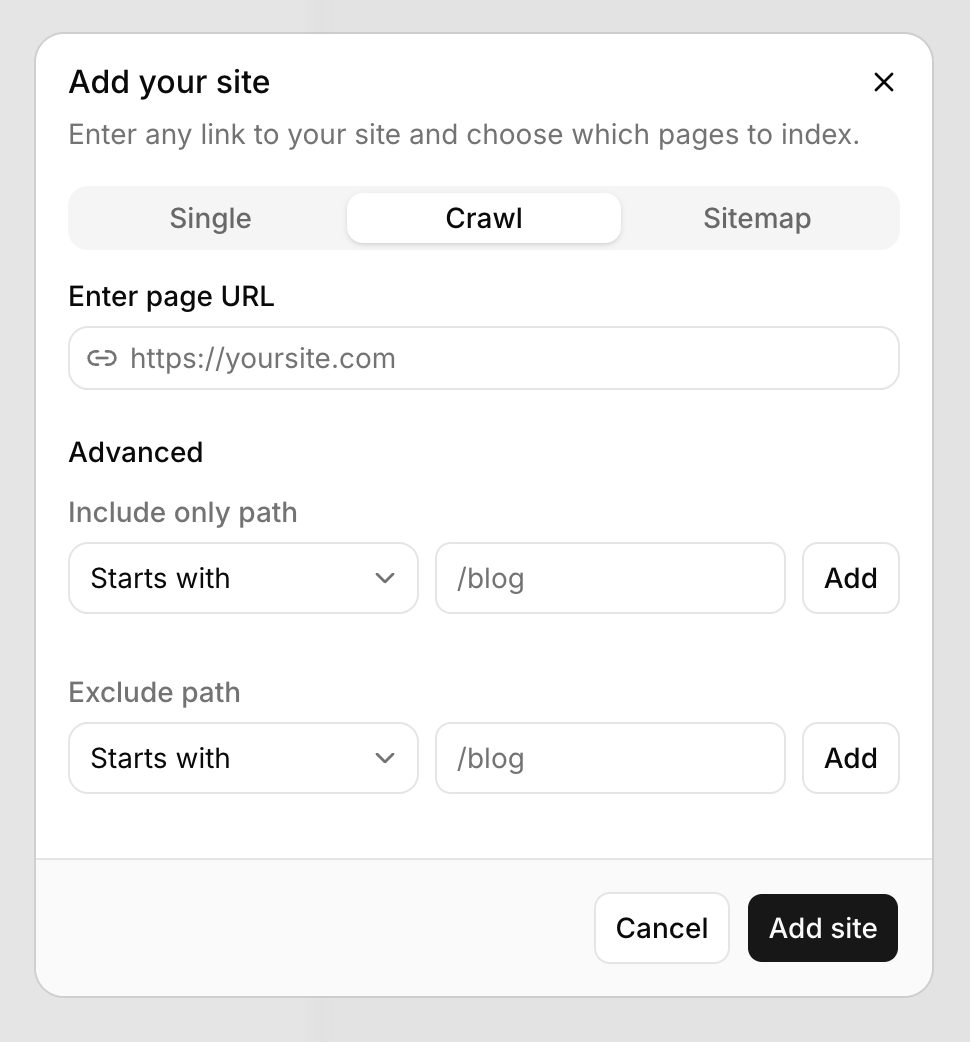
Takkie exposes three ingestion modes. In the current API, these workflows use Scrape, Crawl, and URL discovery:
- Single pulls one page back as clean Markdown, via Scrape with
formats.markdown. - Crawl walks out from a starting URL with include and exclude path rules, via the Crawl API, so a customer can index
/docsand skip/blog. - Sitemap ingests a site's URL list. Map URLs provides an indexed inventory for discovery; Scrape or Crawl fetches the selected pages. Map does not guarantee the complete contents of a site's current sitemap.
For the user, the choice between "this page" and "everything we've ever published" is one tab. For Takkie, it's the difference between an agent that knows a pricing page and an agent that knows the entire product.
"Users can now easily add a single site link or an entire sitemap. After training, their AI agent will have access to that knowledge, of hundreds or thousands of links. Scraped easily and fast using Context.dev."
Key benefits
- Under 30 minutes, in production: a same-session swap of the scraping layer, no staged rollout.
- Training runs that finish: pages behind bot protection come back instead of failing the run.
- Cheap enough to stay free-to-start: pricing that still works underneath a product with no credit card required.
- One step, three ingestion modes: single page, filtered crawl, or full sitemap, all behind a single dialog.
- Hundreds or thousands of links per agent: knowledge bases that scale with the customer's site, not with Takkie's infrastructure work.
The outcome
Takkie's users no longer see failed training runs on secured sites, and Bazzo no longer owns a scraping layer that fails for reasons outside his control. The part of the product that determines whether an agent is useful now works on the sites it needs to work on.
Building agents that learn from the web? Context.dev turns any page, crawl, or sitemap into clean markdown your models can train on, including the sites that block everything else. Start at docs.context.dev.
P.S. Want a support agent that answers on chat and on the phone, trained on your own site? Takkie AI gets you there without a credit card.