
API documentation tends to get written in the last week before launch, by whoever has the time. That's backwards, because for most developers, the docs are the product. Before they've written a line of integration code, they've read (or tried to read) your docs. That's your first impression, and it's usually the one that sticks.
Why docs matter more than teams usually think
Bad docs don't just waste time — they actively push developers toward alternatives. If someone has to guess at an endpoint, read your source code, or file a support ticket to get a basic call working, they'll wonder what else isn't going to work. Your API might be great. Your competitor's might not be. If your competitor's docs are better, that's where the developer ends up.
Where good docs pay off
- Faster onboarding. A working "getting started" flow shortens the time from "signed up" to "first API call" from hours to minutes.
- Fewer support tickets. If the answer is in the docs and the docs are findable, the ticket never gets filed.
- More adoption. Developers who had a good experience recommend the API to their teammates. Developers who had a bad one warn them off.
- Better trust. Docs that are accurate, complete, and up-to-date signal that the company behind them cares about quality. If the docs are sloppy, developers assume the API is too.
Docs are a direct signal of API quality. If the docs are confusing, developers will assume the API is confusing. Sometimes they'll be wrong. Often they'll be right.
Postman's State of the API report puts adoption of API-first approaches at 82% of organizations. The teams that treat APIs as products — which means investing in docs — report faster integration times and more revenue from APIs. That tracks with what you'd expect.
If you want to see these principles working in production, look at how a well-structured company data API exposes complex data without making it hard to use.
Structuring docs so developers can find what they need
Docs aren't just a list of endpoints. They're a navigable space, and the structure has to do some of the work for you. A developer landing on your site cold should be able to figure out where they are, where they need to go, and how to get there in a few seconds.
The teams that get this right — Stripe, Twilio, a handful of others — build an information hierarchy that scales from "I've never heard of this API" to "I need to know every parameter on this specific endpoint." Both of those users should feel welcome on the same site. If you want more on writing and structuring technical content, this guide to writing structures is a decent starting point.
The four sections every API docs site needs
- An overview. What does this API do? Why would I use it? Two paragraphs, no more. If I can't answer those two questions in 30 seconds, I'll leave.
- A getting started guide. The fastest possible path from signup to first successful call. This is the most important page on your site.
- An endpoint reference. Every endpoint, every parameter, every response. The encyclopedia.
- Tutorials and recipes. Longer-form content that shows how to combine endpoints to solve specific problems. "How to prefill a user signup form with brand data" is a tutorial. "The
/v1/brandsendpoint" is reference.
These four sections serve different readers. A new user reads the overview and the getting started guide. A returning user jumps straight to the reference. A user trying to build something real flips between the reference and the tutorials. All three should feel like the site was built for them.
Writing the getting started guide
The getting started guide has exactly one job: get the developer to "hello world" as fast as possible. Everything else is a distraction from that goal. Don't list all the features. Don't explain the philosophy. Don't link to a dozen side quests. Linear, focused, done.
A good getting started guide walks through:
- How to authenticate. How to get an API key, where to put it in the request. Include a copy-pasteable example.
- The first call. Something simple that returns a predictable response. For Context.dev, that's looking up brand data for
stripe.com. - Code samples in the common languages. TypeScript, Python, Ruby, Go, curl. Copy-paste-ready. Working. No ellipses or "// your code here" placeholders.
The first five minutes matter more than anything else. If a developer makes a successful API call in that window, they'll probably integrate. If they don't, they probably won't.
The endpoint reference
Once someone's past the getting started flow, they live in the reference. This is where precision matters. Every endpoint needs its own page, and every page needs the same structure.
At minimum, each endpoint page should document:
| Element | Description | Why it matters |
|---|---|---|
| HTTP Method & Path | e.g., GET /v1/brands/domain/{domain} | The basic shape of the request. |
| Description | "Fetches the full brand kit for a given company domain." | What the endpoint does, in one sentence. |
| Parameters | Path, query, and body params with types and descriptions. | Removes guesswork. Prevents a lot of malformed requests. |
| Request & Response Examples | Full, valid JSON for a successful request and response. | The fastest way for a developer to understand the data shape. |
| Error Codes | HTTP status codes and what they mean for this specific endpoint. | Needed for anyone writing real error handling. |
Predictable structure = faster lookups. Once a developer has used one endpoint page, they know how to use every other endpoint page. That compounds.
Automating docs with OpenAPI
Hand-updating docs every time the API changes is a setup for failure. Something will get missed, and then the docs will lie, and developers will stop trusting them. Automation solves this. A spec-first approach built on the OpenAPI standard is probably the single biggest improvement most teams can make.
The idea: your API is defined in one machine-readable file (YAML or JSON). Every endpoint, parameter, request body, and response lives there. That file is the source of truth. Everything else — docs, client libraries, tests — is generated from it.
Why the single source of truth works
When the OpenAPI spec is the definition of the API, changes happen there first. Add a new endpoint? Update the spec. Deprecate a field? Update the spec. Every downstream artifact gets regenerated.
This solves documentation drift — the problem where the docs and the API have diverged, and nobody's sure which one is right.
An OpenAPI spec isn't just a description of your API. It's the blueprint that everything else is built from.
From spec to interactive docs
Tools like Swagger UI and Redoc consume the OpenAPI file and produce a full documentation site. Interactive, searchable, and always in sync with the spec.
The flow a good docs site guides developers through looks like this:
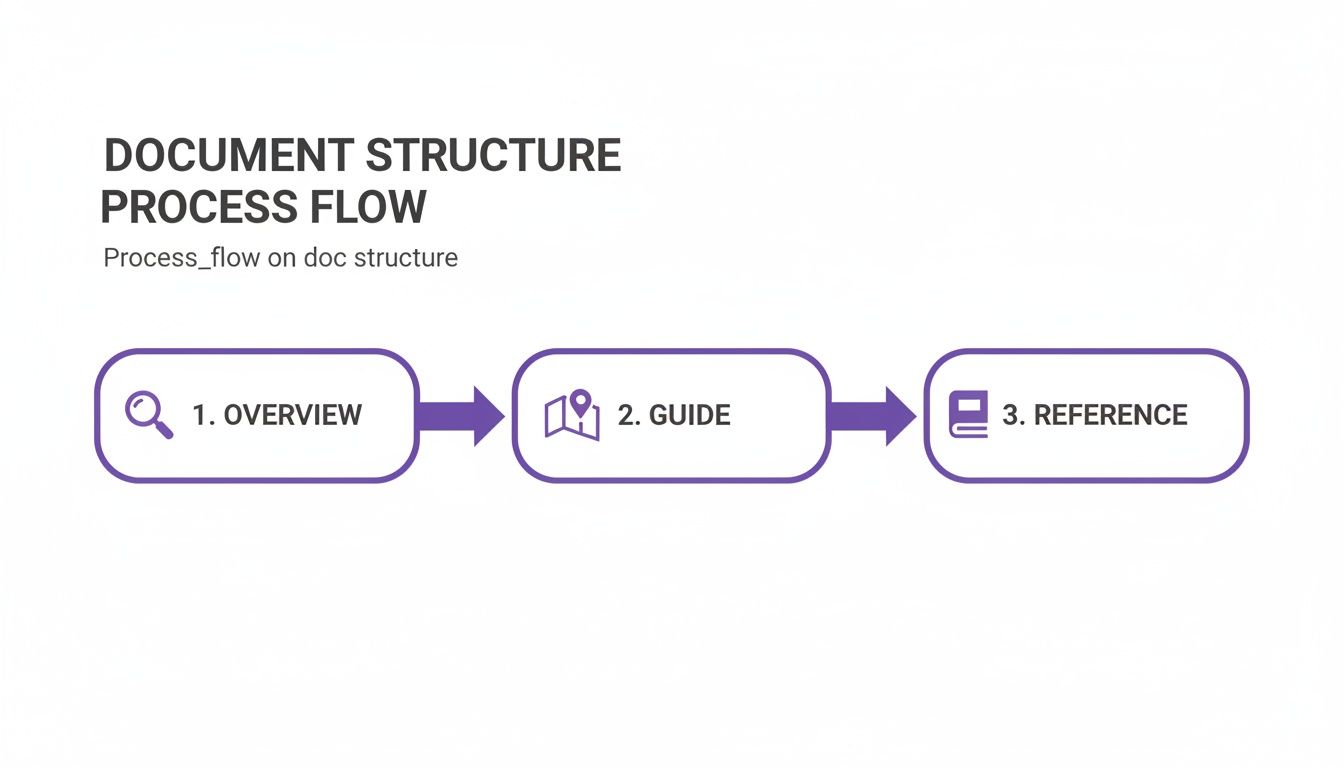
Overview → guide → reference. That's the path. OpenAPI-generated tooling gives you that basically for free.
A generated site typically includes:
- An organized endpoint list in the sidebar
- Parameter tables with types and descriptions for every endpoint
- Request and response schemas rendered as JSON examples
- An interactive API explorer where you can plug in a key and run real calls from the browser
That last one is the killer feature. Instead of reading about an endpoint, a developer can try it, see the real response, and figure out the shape of the data in 30 seconds. It collapses the learning curve from "read docs, write code, test, debug" to "try the endpoint, write code."
What a good OpenAPI snippet looks like
The quality of your generated docs is a direct function of how much detail you put in the spec. Paths and parameter names alone aren't enough — the descriptions and examples are what make the docs usable.
Here's what an endpoint definition for a Context.dev brand lookup might look like:
paths:
  /v1/brands/domain/{domain}:
    get:
      summary: "Get Brand by Domain"
      description: "Fetches the full brand kit, including logos, colors, and fonts, for a given company domain."
      operationId: "getBrandByDomain"
      tags:
        - "Brands"
      parameters:
        - name: "domain"
          in: "path"
          required: true
          description: "The company domain to look up (e.g., stripe.com)."
          schema:
            type: "string"
            example: "context.dev"
      responses:
        '200':
          description: "Successful response with brand data."
          content:
            application/json:
              schema:
                $ref: '#/components/schemas/Brand'
              example:
                name: "Context.dev"
                domain: "context.dev"
                logos:
                  - format: "svg"
                    url: "https://assets.context.dev/logo.svg"
        '404':
          description: "Brand not found for the specified domain."
A few small things in there make a big difference in the output:
summary— the title a developer scans on the sidebardescription— longer explanation of what the endpoint does and why someone would use itexample— a concrete value (context.dev) instead of an abstract placeholder$ref— points to a reusable schema, so you're not redefining the same object in twelve places
The more time you put into the spec, the less time you spend writing docs by hand. And the less likely the docs are to rot.
Writing docs developers actually read
A slick generated site doesn't help if the copy is unclear. Once the structure is in place, the words on the page become the thing that makes or breaks the docs.
The shift to make here is from describing features to explaining how to use them. A developer doesn't just want to know what an endpoint returns. They want to know when to call it, what to do with the response, and what happens if it fails.
Be direct
Short sentences. Active voice. No jargon that isn't necessary.
"The endpoint returns user data" is better than "User data is returned by the endpoint." That's a small edit, but every sentence you write is an opportunity to make the docs 10% clearer. Those edits add up.
Write like a senior engineer explaining something to a junior one. Not a vendor pitching a product, and not a textbook trying to be comprehensive.
Copy-paste-ready examples are non-negotiable. If a code sample has // your code here or requires a developer to piece together multiple snippets, you've added friction for no reason. Every example should be a complete, runnable thing.
Explain why, not just what
This is where most docs fall short. A description of what an endpoint returns is useful but incomplete. A description of when you'd use it is what makes docs actually practical.
For example, when documenting a Context.dev logo endpoint:
- Weak: "The
/v1/brands/logoendpoint returns a company's logo." - Better: "Call
/v1/brands/logoduring signup to pull the new user's company logo, which you can show in the dashboard to make the product feel tailored from the first login."
The second version connects the endpoint to a real product outcome. A developer reading that immediately has an idea for how to use it. The first version just describes what the response looks like.
Clarity vs vagueness, concretely
Small language choices compound. Here's the pattern:
| Element | Vague | Clear |
|---|---|---|
| Endpoint Summary | Data Retrieval Endpoint | Get User Profile by ID |
| Parameter Description | This is the identifier string for the user. | The unique userId for the user you want to retrieve. |
| Error Message Help | An authentication error was encountered. | 401 Unauthorized: Your API key is invalid or missing. Check your Authorization header. |
| Code Example Intro | Below is a code sample. | To create a new project, send a POST request to /v1/projects with the following JSON body: |
The clear versions are specific, active, and give the developer the context they need right there. That's the style to aim for throughout.
Keeping docs accurate over time
Nothing destroys developer trust faster than docs that lie. An outdated parameter, a missing field, a wrong response example — any one of those sends someone into an afternoon of debugging something that shouldn't be broken.
Docs aren't write-once. They're a product that has to stay in sync with the code. Without a real process for that, they rot.
Version docs alongside the code
Docs should live in the same repo as the API. They should go through the same PR review process. They should follow the same version control practices you already use.
- Make doc updates part of the PR. A PR that changes the public API should also change the docs. If it doesn't, it doesn't get merged.
- Review docs like code. Peer review catches the same kinds of errors in prose that it catches in implementation.
- Use git history. If you need to know when a field changed or why, the commit log tells you.
This coupling is your best defense against drift. Nothing ships without the docs being updated first.
Wire docs into CI/CD
The surest way to keep docs current is to deploy them automatically when the API deploys. A CI/CD stage that builds the docs from the OpenAPI spec and ships them to your hosting provider removes the "I'll update it later" problem entirely.
Stale docs are worse than no docs. Automating deployment is the single most effective way to prevent drift.
A changelog people will actually read
Developers who depend on your API need to know what's changing, especially when something might break their integration. A changelog is the main communication channel for that.
What makes a good one:
- Easy to find. Link to it from the main docs page. Don't bury it.
- Clearly organized. Group by version and date. Use consistent headings: Added, Changed, Deprecated, Fixed.
- Actionable. For breaking changes, include a migration guide. Don't just say "field renamed" — show the before and after.
PayPal's release notes are a good reference. Stripe's API changelog is another.
Feedback loops
Docs are never finished. Your users will find confusing sections, missing examples, and outdated explanations before you do. Make it easy for them to tell you.
- A "was this helpful?" widget at the bottom of every page. Thumbs up/down, optional comment.
- An "edit on GitHub" link for open-source docs, so users can submit PRs directly.
- A support channel — a forum, a Discord, a support desk — linked from the docs so people have somewhere to ask.
Acting on that feedback matters as much as collecting it. If users report the same confusing section three times and nothing changes, they'll stop reporting. Some teams also use AI assistants to surface patterns in user questions — how DocsBot reduces onboarding friction is one example of that in practice.
Common questions
What if our API has no docs yet?
Starting from zero is actually an advantage — no legacy to clean up. The fastest path is to generate an OpenAPI spec from the existing code or API traffic. Tools can sniff requests or inspect code to produce a baseline. You'll have a machine-readable inventory of every endpoint in a few hours.
From there:
- Prioritize ruthlessly. Authentication first. Then the core endpoints developers need to make the API do anything useful. Everything else can wait.
- Write for humans. The auto-generated spec has the shapes but not the explanations. Add
summaryanddescriptionto the priority endpoints first. - Add real examples. A working request and response for each priority endpoint is worth more than a thorough description.
- Ship it. Use Swagger UI or Redoc to render the spec as a real site. Get something useful in front of developers now; iterate from there.
How should we handle multiple API versions?
Maintain separate docs for each supported version of the API. A version switcher at the top of the site is table stakes — developers should be able to pin to the version they're actually using.
Each version has its own OpenAPI spec, which drives its own docs. When you cut a new release, the new spec becomes the source of truth for that version's docs.
A detailed, easy-to-find changelog isn't optional here. It should show what's new, what changed, and what's deprecated, with migration instructions for each breaking change.
This is the approach Stripe and PayPal both take. It prevents old clients from silently breaking and gives new ones a clean upgrade path.
How detailed should the docs be?
It depends on which docs. Layer the information by audience.
For the endpoint reference, there's almost no such thing as too much detail. Document every parameter, every response code, every error. Developers will search for this stuff at 2am trying to debug a specific issue.
For getting started and tutorials, go in the opposite direction. Focus on the happy path. Don't bury a new user in edge cases or optional parameters. The goal is a quick win.
UI patterns help here — expandable sections, tabs, "show more" links. Give users the simple version first, let them drill in when they need to. That way you're not choosing between thorough and approachable. You're giving people both.
Building onboarding that adapts to each user? With Context.dev, you can pull company logos, colors, and fonts from a single API call. Skip the manual asset collection. Get a free API key.