
Flusterduck is a user confusion monitoring and tracking platform. It helps teams detect when users get stuck, identify the page elements involved, and turn those signals into issues product and engineering teams can actually act on.
For Keats Waller, founder of Flusterduck, the hard part was not collecting interaction signals. It was helping AI agents understand what those signals meant in the broader context of the page, product, and website.
Context.dev became the missing context layer behind Flusterduck's most important feature: issues.
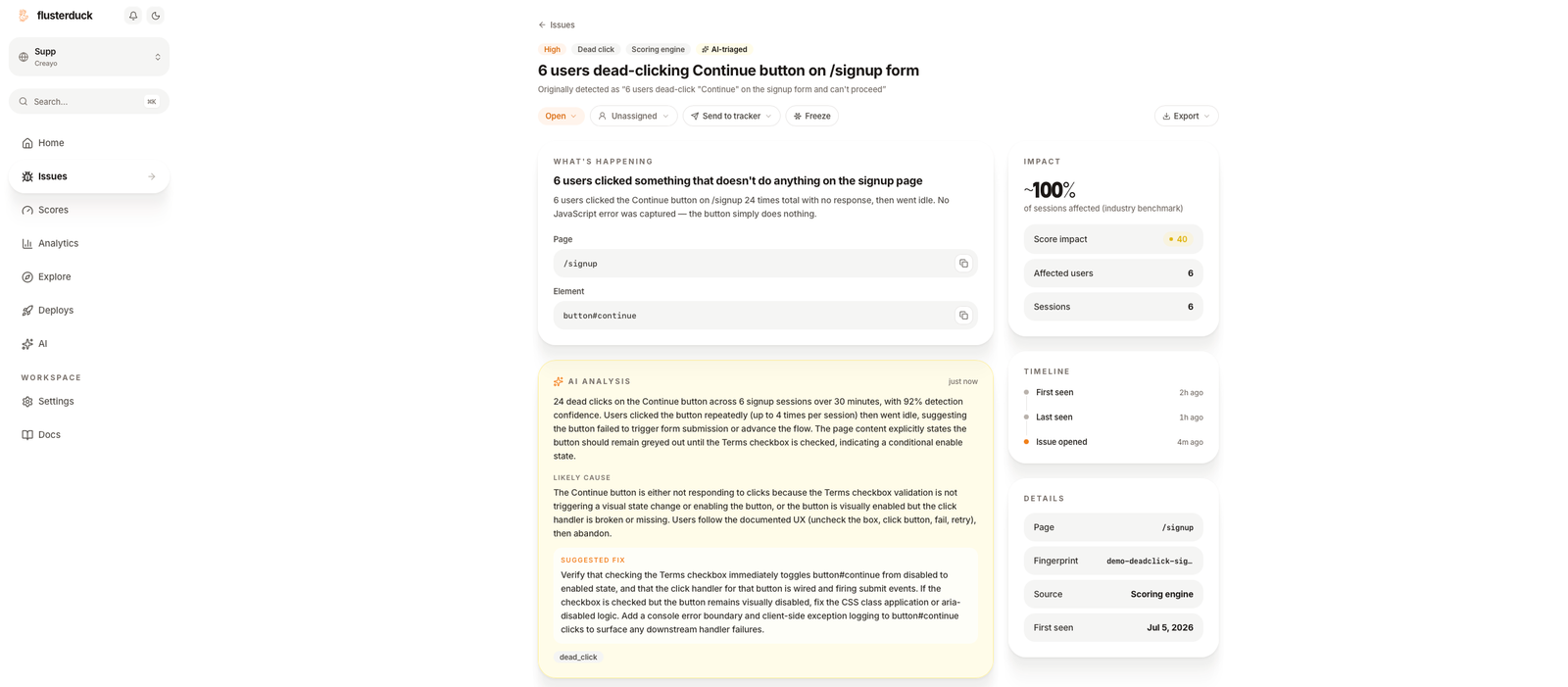
Here is how Keats put the integration:
"The API integration was smooth and seamless and all in took under 15 minutes of mostly agent driven setup."
What is Flusterduck?
Flusterduck monitors user confusion across websites and product flows. Instead of asking teams to wait for support tickets or manually review sessions, it detects patterns like dead clicks, repeated clicks, scoring anomalies, and stuck flows, then turns them into prioritized issues.
Those issues need to be specific. A vague "something is broken" alert does not help a team move fast. Flusterduck needs to explain what happened, where it happened, which element was involved, how many users were affected, and what the team should check next.
The use case
Flusterduck uses Context.dev to help its agents understand the surrounding website when diagnosing user confusion.
Before Context.dev, Flusterduck's agents could see raw element labels and captured behavioral signals. That was useful, but incomplete. When an agent tried to explain why users were stuck, it often had to make a poorly educated guess because it did not have the full backstory of the page.
As Keats described it, too many requests landed on some version of "more information is needed." Keats initially spent weeks redesigning the SDK to send more and more data from inside the page. The breakthrough was realizing the agent needed to zoom out. Context.dev added the external sources and website context that helped Flusterduck understand not just the clicked element, but the page around it.
How they found Context.dev
Keats found Context.dev on Google while looking for a way to give Flusterduck's AI agents more grounded context for UX bugs.
He had considered and tried other options, but each one was flawed in some important way. After researching the space, he landed on Context.dev as the fastest and most well-rounded option for Flusterduck's needs.
In his words:
"Context.dev is simply the best, fastest, and most well rounded solution for all of our needs as a business. I couldn't imagine anything better."
Integration experience
The integration took under 15 minutes and was mostly agent driven. That mattered because Flusterduck was not adding a side feature. Context.dev was going into the issue diagnosis path, the feature Keats described as the company's most important.
Once integrated, Context.dev gave Flusterduck's agents the page and website background they had been missing. Instead of working from raw labels alone, the agents could connect interaction signals to specific page elements, understand the likely flow, and produce more useful diagnosis and routing.
Key benefits
- Issue diagnosis in seconds: Flusterduck's agents can move from confusion signals to useful explanations much faster.
- More grounded AI analysis: Context.dev gives agents website context instead of forcing them to guess from raw element labels alone.
- Specific page-element guidance: Agents can point to the relevant page and element when explaining what happened.
- Less SDK complexity: Flusterduck did not need to keep pushing more data through its own SDK to compensate for missing external context.
- A core feature gets stronger: Context.dev now powers Flusterduck's issues workflow, helping route and describe user confusion automatically.
By using Context.dev, Flusterduck turned its issue diagnosis from a signal-only workflow into a context-aware AI workflow. The result is faster triage, clearer explanations, and more actionable fixes for teams trying to reduce user confusion.
Building agents that need to understand what is happening on a website, not just inside an event payload? Context.dev gives you the web context layer so your product can diagnose, route, and explain issues with more confidence.